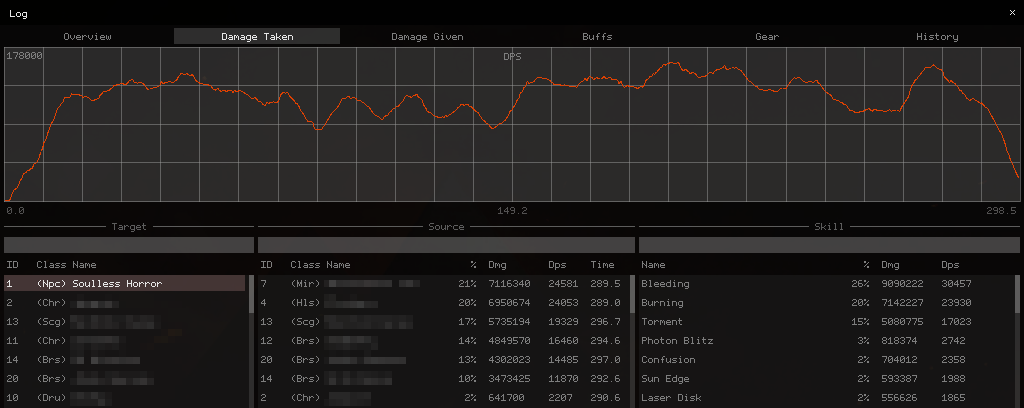
A Combat Analysis Mod for Guild Wars 2
Starting in 2018, I built and maintained an addon for Guild Wars 2. It started as a small tool to show my own DPS in combat, and over the following years it grew into a full combat-analysis suite:
- real-time group and personal DPS analysis and logging,
- GUI overlays for healing and combat awareness,
- automatic, signed network updates with live reloading,
- build templates for swapping gear, traits and skills in one click.
This is a write-up of how those pieces worked, and of the reverse engineering underneath all of them. Guild Wars 2 offers no API for combat data, so everything here had to be pulled out of the running client. I still call the thing a “meter” below even though it long outgrew the name.
Getting code into the game: DLL proxying
The whole project hangs off one trick. When Windows loads a DLL it checks the application’s own directory first, so if I drop my own d3d9.dll next to the game executable and export every symbol the game imports from the real one, the OS loads my DLL automatically. Each exported function just forwards to the genuine system DLL, so to the game the proxy is indistinguishable from the real thing. No separate injector, no extra process - the operating system does the injection for me.
The nice side effect is that I’m now holding the engine’s IDirect3D9 interface. That gives me a clean place to patch IDirect3DDevice9::Present (my per-frame tick, where the overlay gets drawn) and IDirect3DDevice9::Reset (the “device was lost, recreate your GPU resources” hook). Those two functions are the entire seam between my code and the game’s render loop.
Hot-reloading
Launching the game and loading into a map takes about a minute. Iterating on code at that cadence is miserable, so the d3d9.dll proxy deliberately contains no game-specific logic at all - it’s just a loader for the actual meter DLL.
Windows write-locks a DLL on disk while it’s loaded, which would normally stop me from recompiling over it. So the loader copies the meter DLL to a temp directory and loads the copy, leaving the original free to be overwritten by a fresh build or a network update. A hotkey - or the meter itself, after pulling an update - triggers a reload, and the temp file is cleaned up when the game closes. The result is that I can rebuild and reload the meter in a second or two without ever leaving the map.
Updating itself, securely
The meter can fetch a new version over the network and hot-reload itself while the game is running. Because that’s effectively remote code execution into a process people are running on their own machines, I treated the update channel as a security problem from the start, aiming for both integrity and authenticity.
Versions are identified with a cheap CRC32, but trust comes from RSA. I generated a 4096-bit key pair and embedded the public key directly in the meter binary - the same idea as the certificate pinning browsers used to do, where a known key is baked into the client instead of trusted at runtime. To ship an update I sign the SHA-256 hash of the update payload with my private key. The client verifies that signature with its embedded public key and only writes the update to disk once it checks out; on failure the in-memory buffer is overwritten with zeros. As long as my private key stays secret and the first download came from a trusted source, that defeats man-in-the-middle, DNS spoofing, and IP spoofing - and it means even a compromised update server can’t push a malicious build, because it never holds the signing key.
Delivery runs over UDP for low overhead. Each client is just an ip:port pair costing 48 bytes of state, with no send or receive buffers - far lighter than the equivalent over TCP. To stop the obvious abuse, a connecting client has to echo back a server-generated token before the server sends any data (the same trick as TCP SYN cookies), which kills IP-spoofing and amplification attacks. Each IP is capped to a few simultaneous connections so one host can’t spin up thousands of fake clients on different ports, and every client gets a bandwidth budget before it’s throttled or dropped. The one real downside is compatibility: not every ISP or router tracks UDP “connections” cleanly, especially the European setups running Carrier-grade NAT over DS-Lite.
Drawing the overlay
The renderer targets Direct3D 9, which is still what the game uses. Every 2D primitive for a frame is batched into one vertex buffer and one index buffer and submitted in a single draw call; preparing and submitting tens of thousands of vertices takes under 100 microseconds.
The font is my own, embedded as a 1-bit bitmap covering the full Latin range (0x20-0xFF) in just 1673 bytes - smaller than the source PNG it came from - and expanded at runtime into a 256x128 RGBA texture.
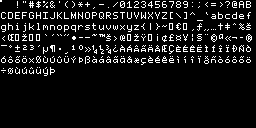
A bitmap font is the obvious choice when performance matters. Anti-aliased text only looks good at small sizes when you either control the background colour or can read what’s behind it. ClearType does the latter, but reading back the current scene from the GPU every frame is not cheap, so a crisp bitmap wins.
My own immediate-mode GUI
I’m familiar with Dear ImGui, but I wrote my own immediate-mode GUI instead. Binary size, compile times, performance and appearance all pushed me that way.
It shares most of ImGui’s feature set with two self-imposed restrictions: multi-line elements like graphs may never live inside a scroll region, and every window must be fully initialized when it’s created. Those two rules are what let the entire GUI render in a single draw call with no scissor rectangles, and let vertices and indices be written straight into their buffers with no intermediate memcpy.
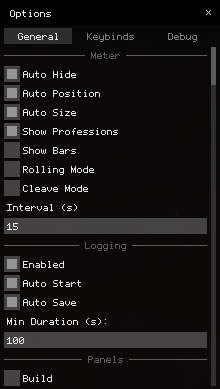
The API stays small. The panel above is the whole of this:
if (gui::add_window("Options", b_options) == false) {
    return;
}

gui::set_columns(3);

static i32 tab_idx;
gui::add_tab(tab_idx, 0, "General");
gui::add_tab(tab_idx, 1, "Keybinds");
gui::add_tab(tab_idx, 2, "Debug");

gui::set_columns(1);

if (tab_idx == 0) {
    static gui::scroll_t scroll;
    gui::add_scroll(&scroll);

    gui::add_header("Meter");
    gui::add_check_node(c_dps_auto_hide, "Auto Hide");
    gui::add_check_node(c_dps_auto_pos, "Auto Position");
    gui::add_check_node(c_dps_auto_size, "Auto Size");
    gui::add_check_node(c_dps_show_profs, "Show Professions");
    gui::add_check_node(c_dps_show_bars, "Show Bars");
    gui::add_check_bind(b_dps_rolling, "Rolling Mode");
    gui::add_check_bind(b_dps_cleave, "Cleave Mode");
    gui::add_label("Interval (s)");
    gui::add_input_int_node(c_dps_interval, 1, 60);

    gui::add_header("Logging");
    gui::add_check_node(c_log_enabled, "Enabled");
    gui::add_check_node(c_log_auto_start, "Auto Start");
    gui::add_check_node(c_log_auto_save, "Auto Save");

    gui::add_label("Min Duration (s):");
    gui::add_input_int_node(c_log_auto_time, 0, 9999);

    gui::add_header("Panels");
    gui::add_check_bind(b_build, "Build");
    gui::add_check_bind(b_compass, "Compass");
    gui::add_check_bind(b_log, "Log");
    gui::add_check_bind(b_player_info, "Player Info");
    gui::add_check_bind(b_target_info, "Target Info");

    gui::end_scroll();
} // other tabs excluded
Getting the data: hooking the network layer
With the rendering sorted, the real problem is where the numbers come from. The game has no combat API, so all of it is derived from the network messages the client receives. There are roughly 1300 distinct message types, each with an entry in a dispatch table. Reversing 1300 handlers by hand would be hopeless - except the developers left a shortcut. Most functions in Guild Wars 2 use a custom assert for crash logging, and those asserts embed source file paths and variable names as plain string literals.
So a function that references these strings:
"character", "itemDef", "armorDef", "..\..\..\Game\Char\Cli\ChCliInventory.cpp"is obviously doing something with equipment in the player’s inventory - decompiling it then shows it validates whether a piece of gear is allowed to be equipped. And one referencing these:
"character", "sourceAgent", "..\..\..\Game\Char\Cli\ChCliMsg.cpp"is a “Character Client Message” doing something to a character because of a sourceAgent. That one turns out to fire when damage is dealt to a character. The assert strings turn a blind search into a guided one.
Hooking those handlers gives me the events I care about: damage (including interrupts, blocks and evades), boon and condition applications, multi- and single-stack removals and cleanses, skill casts, health updates, weapon swaps, and combat state changes. Each event type gets its own struct, all collapsed into one tagged union:
struct ev_buff_apply_t {
    u16 target; u16 source; u16 skill;
    u8 level; u8 active;
    u16 id; u16 overstack; u32 duration;
};

struct ev_buff_cleanse_t {
    u16 target; u16 source; u16 skill;
    u32 duration; u32 longest;
};

struct ev_buff_remove_t {
    u16 target; u16 source; u16 skill;
    u16 id; u32 duration; u32 left;
};

struct ev_cast_t {
    u16 target; u16 skill;
    u8 quickness; u32 duration; f32 rate;
};

struct ev_damage_t {
    u16 target; u16 source; u16 skill;
    u8 type; u8 flags; i32 value;
};

struct ev_health_t { u16 target; i32 value; i32 total; };
struct ev_state_t  { u16 target; u16 action; };
struct ev_swap_t   { u16 target; u8 set; };

struct event_t {
    u32 time_ms;
    u16 type;
    u16 target;
    u16 source;

    union {
        ev_buff_apply_t   buff_apply;
        ev_buff_cleanse_t buff_cleanse;
        ev_buff_remove_t  buff_remove;
        ev_cast_t         cast;
        ev_damage_t       damage;
        ev_health_t       health;
        ev_state_t        state;
        ev_swap_t         swap;
    };
};
Every entity on the map is a 16-bit agent ID, and characters (the type the player inherits from) are a kind of agent. Those IDs get reused when an entity dies, despawns or disconnects, so I can’t treat them as stable. I remap them to my own IDs through a lookup table that carries the real metadata:
struct agent_t {
    ...
    u16 log_id;
    u16 game_id;
    u16 species_id;
    u8  subgroup_id;
    u8  profession_type;
    u8  is_player;
    u8  is_name_resolved;
    CHAR name[30];
    CHAR account[30];
    stats_t stats;
    gear_t  gear;
    ...
};
When a new agent enters vision during combat I replace any existing entry that shares its game ID - unless that entry is the same player or boss - which lets stats survive an agent leaving and re-entering my vision mid-fight.
The DPS overlay
For DPS I keep a hash table of targets, and for each target a second hash table of the sources dealing damage to it. That gives O(1) insertion of new damage and O(1) lookup of whatever target is currently selected. A map tops out around 100 players, so each source table is a fixed array of 128 slots; when it fills, it evicts whichever source hasn’t attacked the target recently.
DPS itself is just total damage divided by time in combat - but bosses can go invulnerable, which would otherwise tank everyone’s numbers. So I pause the combat timer across invulnerability windows:
if (ev.state.action == CBT_STATE_INVUL_START) {
    frozen = true;
    time_elapsed += (ev.time_ms - time_started);
    time_started = ev.time_ms;
} else if (ev.state.action == CBT_STATE_INVUL_LEAVE && frozen) {
    frozen = false;
    time_started = ev.time_ms;
}
Simulating condition damage
This was the hard part, and the bit I’m proudest of. The server only sends exact numbers for direct damage that happens within your vision. Condition damage - damage over time - is only sent to you when you’re personally the source or the target. But plenty of builds do most of their damage through conditions, so without estimating other players’ condi damage, a group meter would be close to useless. Since all damage is computed server-side, the only way forward is to reproduce the server’s observable behaviour with a simulation of my own.
The timing model is the key. Applying any effect to an agent starts a timer that ticks once per second, and it keeps ticking as long as any effect is on them. That shared clock means a freshly applied effect gets a partial tick for the gap between its application and the next whole-second tick, and another partial when it expires with less than a full 1000ms remaining. Get the partial ticks wrong and the whole estimate drifts.
Per source, per target I store an array of the effects that source applied. Insertion and single-stack removal are O(1) by swapping elements; multi-stack removal is O(n). A per-effect-type hash table would speed the removals up, but a single source can stack hundreds of effects and the set of types isn’t known in advance, so a flat array wins on space and cache behaviour. On each 1000ms tick I count the active stacks of every type - bleeding, burning, and so on - and run each type’s damage formula, looping over every source for every target because both sides’ stats feed the calculation.
Which raises the real obstacle: the server doesn’t send real stat values for anyone but you. So I estimate each agent’s stats from their equipment, traits and active effects. Conveniently, Guild Wars 2 sends other players’ gear and traits to the client even though they aren’t meant to be visible, so equipment stats fall out of cross-referencing the tooltip data in the game’s content definitions. Traits have to be handled one by one, and honestly most of the meter’s ongoing maintenance was repairing this stat-estimation layer after every balance patch.
Put together, the simulation lands within about 0.12% of the real condition damage for most classes. The only error comes from rounding around tick start and application times, accumulating on the first and last tick of a stack at roughly 0±1 per stack - so accuracy scales with how often conditions are reapplied.
The log panel
Logging runs automatically from the moment you enter combat until you leave, and saves to disk if the fight lasted longer than a threshold you set. The meter watches the log folder for changes so logs can be dropped in and shared between players, and it keeps the current (or last) encounter live, updating the analysis in real time while the panel is open.
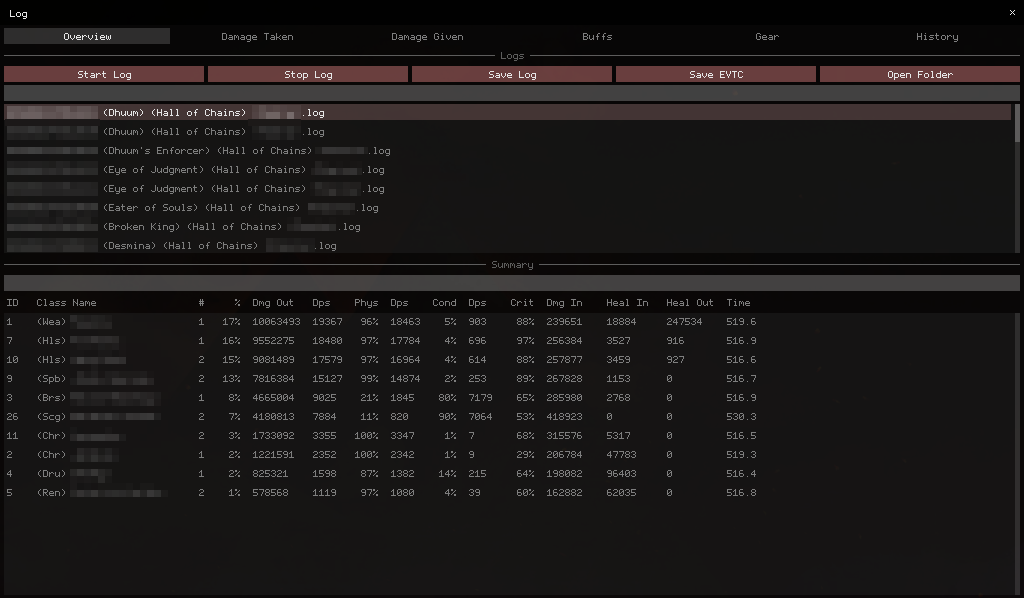
Nearly every list is filterable, with the filtered results stored as plain indices into the underlying data so re-filtering is cheap. The two main views present the same fight from opposite directions - target to source and source to target - alongside a graph of either total damage or rolling 10-second DPS, filterable by target, source and skill. A separate buffs view covers both boons and conditions, showing uptime over the fight, average stacks on a target, and applications over time per source. A gear view lists everyone’s equipment, traits and the estimated stats that fed the condition simulation, which is great for debugging and for seeing how other players reached their numbers. The last view is just the raw event log with a few filters.
Build templates
Guild Wars 2 actively wants you to swap gear and traits between encounters but automates none of it. Reusing the same machinery that estimates stats, I let the player save their current build as a template and load it back later, or strip all of their gear into their inventory or bank in one action.
It works by calling the exact same inventory functions - and sending the same network messages to the server - that the native UI uses for equip, unequip and stat-swap operations. All of those are trivially reversed out of the player inventory class and its vtable. The result is functionally identical to doing it by hand, just far faster.
The other overlays
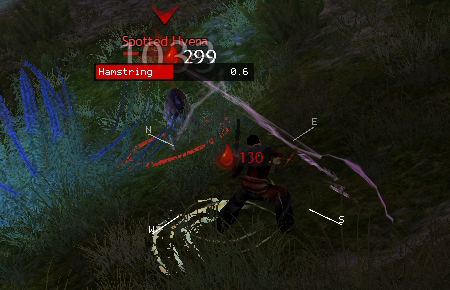
Combat in Guild Wars 2 is visually noisy, which makes enemy animations hard to read. The attack overlay puts the name of the attack each enemy is casting, plus the remaining cast time, right over that enemy - the kind of thing Deadly Boss Mods does in World of Warcraft. The compass in the same shot is rendered around the player’s model (in 2D, faded out where it would cover the character) for orienting during raid mechanics.
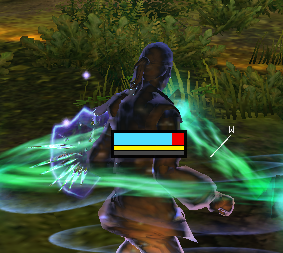
The health overlay floats status above every allied player: current health and the stacks of a few damage-boosting buffs that matter for support, like might and alacrity. The bar’s colour tracks the player’s stance, so a healer can tell at a glance when someone can’t currently receive healing.
There are a couple more in the same vein. A gadget overlay labels interactable objects with their name and distance - useful because the game’s own labels fade with distance and hide behind walls - depth-sorted after projecting to screen space and capped at 500 labels per frame; agent names resolve asynchronously and slowly, so I cache them by ID and limit how many resolve each frame. A target-info overlay shows the target’s health percentage, raw health value, distance and breakbar. And the whole renderer supports internal UI scaling, so every one of these works regardless of monitor DPI.
Closing thoughts
It began in 2018 as something far smaller: an addon that shared DPS between party members over a simple client-server model, with no condition estimation, no analysis and no real GUI. Almost everything above accreted over the years that followed. It was never a product - more of a long-running experiment, and the appeal for me was always the reverse engineering itself as much as anything it let me do in the game.
There’s a nice loop in it, though. Years later I came back to the same game from the opposite end with MCA Benches: instead of hooking the live client, parsing the structured combat logs other tools now produce, by way of dps.report. The same game and the same hunger for combat data, approached from completely different directions.